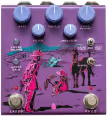
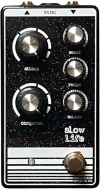
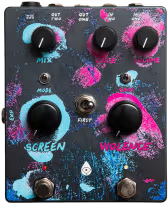
The Screen Violence is a CHVRCHES collaboration that Old Blood Noise Endeavors built to match the atmosphere of the band’s 2021 album of the same name. What they landed on is a tube-inspired overdrive paired with a morphing one-knob ambience engine, both running in stereo, with a toggle to flip their order. Modulation, slap-back delay, reverb, fuzzy drive, and countless ways to combine all of that into washy dream-pop or gritty shoegaze soundscapes. I’m digging this pedal so much.
Controls
The panel splits into two sides with a routing toggle bridging them. Top row: Mix (Screen side wet/dry), Voice, and Volume. Below those sit two toggles: Mode on the left selects between the two Screen voices, and Gain on the right shifts the Violence between two drive characters. Centered between both sides is the First toggle, a horizontal switch that sets signal order. Below it are the two main knobs: Screen on the left and Violence (gain) on the right.
Voice sits before the gain stage, so pushing it up adds saturation to the high end rather than just brightening the output. Gain moves between more gain with tighter compression and less gain with a more open feel. The Screen knob sweeps through chorus/vibrato, modulated delay, and modulated reverb in a fluid continuum rather than stepping between labeled modes. In the demo above I’ve set up sweeps for the Screen knob in both Mode 1 and Mode 2, the Gain toggle, the Voice knob, and the First (order) toggle, so you can hear what each one does to the same riff.
How It Sounds
Dirty Slap Back (Violence at 8, Voice at 8, Screen at 3, Mode 1) shows the two sides working together: the Screen knob at 3 puts it in short delay territory, giving the overdrive a slap-back echo with a touch of modulation. Stacked Violence (Violence at 10, Voice at 2, is_stacked engaged) is the hidden mono mode: hold both footswitches five seconds until the right LED turns red, and the Violence circuit becomes a harder, fuzzier drive. The Shoegazin’ Toggle sweep flips the First toggle so you can hear Screen-into-Violence versus Violence-into-Screen directly.
The Screen Violence has been an amazing tool for producing tracks. I reserved a permanent space for it on my recording pedalboard.
Screen Violence vs Melee
The Walrus Audio Melee is the other drive-plus-reverb box on the site. Both combine a dirt circuit with ambient effects in one enclosure with a flippable signal order. Where the Melee gives you three named reverb algorithms (ambient, octave-down, reverse), the Screen Violence’s Screen knob sweeps a broader palette that blurs modulation, delay, and reverb into each other. That suits players who want to get lost in textures rather than dial in a specific reverb character.
The drive characters also differ. The Melee’s is RAT-derived, clipping harder with more low-end authority for heavy shoegaze. The Screen Violence’s overdrive is more open and cleaner at lower gain settings. And crucially, the Screen Violence runs true stereo out. If you know exactly which reverb sound you want and prefer a more muscular dirt circuit, the Melee is the cleaner call. If you want stereo width, a morphing ambient palette, and an overdrive that plays nicely with whatever reverb voice the Screen knob lands on, the Screen Violence is the one.
Who It’s For
Dream-pop and shoegaze players are the obvious audience, but the Screen Violence earns its place on any board that needs a single box to handle drive and texture in stereo. The order toggle keeps it genuinely flexible: Screen-first gives you a washy, reverb-saturated input to the drive, while Violence-first pushes a dirtier signal into the ambience engine for that gated-noise shoegaze tail. It also works as a purely ambient pedal with the Violence footswitch disengaged. The caveat is that the Screen knob’s fluid design trades precision for feel. If you need to recall a specific modulation rate or reverb tail length, you’ll want to mark your settings. For everyone who wants texture over precision, it delivers.
All overdubs were done with different pickup configurations from the Fidelity Stellarosa and the Screen Violence with different settings. This is such a great, versatile sound device that I could record an entire album just with this.
Bass
JMJ Fender Mustang, played with pick, tone 100%, with muting foam at the bridge