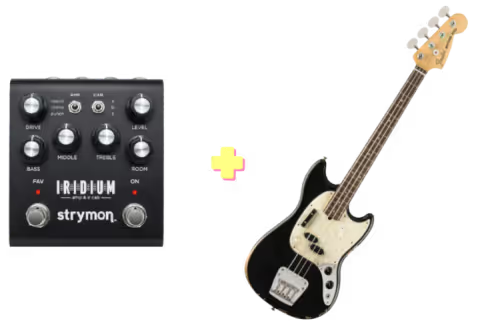
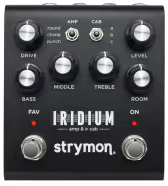
The Strymon Iridium is an amp and cab modeler with three amp voicings, Round, Chime and Punch, an onboard IR cabinet section, and a room reverb, all in one pedal-sized box with stereo outs. Strymon’s Matrix Modeling engine borrows its character from a Fender Deluxe Reverb, a Vox AC30 and a Marshall Plexi Super Lead, without claiming to be an exact clone of any of them.
This was the first amp modeler I plugged in that sounded great before I touched a single knob. The onboard IR selection is strong out of the box, the EQ on every amp model is genuinely useful, and the drive stage holds up on its own with nothing in front of it. The room reverb just adds a bit of three-dimensionality to what’s otherwise a dry, ampless tone.
Controls
Reading the panel left to right, top row first: Drive feeds a real class-A JFET analog gain stage that works alongside each amp’s modeled preamp gain. The Amp toggle selects the amp voicing, the Cab toggle selects the cabinet, and Level sets output. The second row holds Bass, Middle and Treble, plus Room for the reverb mix. The Cab toggle’s default position loads an OwnHammer AC30 2x12 AlNiCo IR, which suits Chime well.
Middle changes job per amp: a Blackface-style EQ shift on Round (down scoops mids, up drifts toward Tweed), a treble cut on Chime (down for max treble, up rolls it off), and the same mid-frequency shaping on Punch, whose real trick is a Drive range running clean past Plexi-style breakup. Room hides a feature: hold the ON footswitch until both LEDs flash, release it, then turn Room to step through small, medium and large sizes, the ON LED shifting green to amber to red. In the demo above, the Vox Treble Cut Sweep and Fender Middle Sweep show how Middle behaves per amp, and the Marshall Gain Sweep covers Punch’s full Drive range.
How It Sounds
Crunchy Vox pairs Chime with Drive around 6 and a small room barely there: bright and jangly, right where clarity turns into crunch. Vox Ambient Clean drops the drive and opens Room to a large room instead, showing how much space that reverb adds when it’s not just background seasoning.
Fender Clean sits at moderate settings on Round with a small room behind it, the clean-platform tone most players would reach for as a drive-pedal base. Marshall Crunch pushes Drive and Treble together on Punch with a small room, landing in chewy, hot-rodded Plexi territory beyond either the Fender or Vox settings.
Iridium vs ACS1
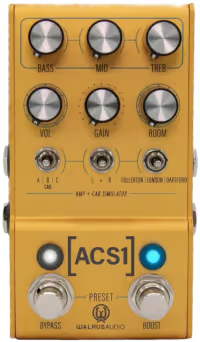
The Walrus Audio ACS1 is the closest rival, covering the same brief: three amp models voiced after Fender, Marshall and Vox amps, a room reverb, and IR cabs with custom loading. The Iridium’s Drive is a real class-A JFET analog circuit, gain happening before anything’s digitized, while the ACS1 is fully digital. The Iridium’s Middle knob changes function per amp model; the ACS1’s Mid stays the same across all three. The ACS1 counters with a dual-amp stereo mode, running two amps left and right at once, which the Iridium doesn’t do.
Who It’s For
The Iridium suits anyone building a direct or silent-stage rig who wants an amp platform that sounds close to finished out of the box, not one needing a lot of EQ hunting. It works as a pedal-platform front end, since all three models take drive pedals well below noon on Drive, and as a fuller solo voice once Punch’s Drive gets pushed further. Home recordists and in-ear-monitor players are the obvious fits.
If a true spring or plate reverb built into the box is what you want, look elsewhere: Room seasons a direct tone rather than standing in as the main ambient effect. And running two amp models in stereo at once is the ACS1’s trick, not this one’s.
Specs
Three amp models via Matrix Modeling: Round (Fender Deluxe Reverb), Chime (Vox AC30), Punch (Marshall Plexi Super Lead)
Class-A JFET analog preamp stage, up to 22dB of gain
Nine onboard stereo IR cabinets at 24-bit/96kHz (OwnHammer, Celestion, cabIR, Valhallir); custom IRs loadable over USB
Room reverb: hybrid IR and algorithmic design, small, medium and large room sizes
Transparent Analog Buffered Bypass
Stereo in/out, headphone output, USB, EXP/MIDI jack for up to 300 MIDI presets or expression control
Power: 9V DC center negative, 500mA minimum
Size: 4.5 x 4 x 2.4 inches; anodized black aluminum chassis, built in the USA