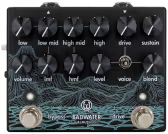
The Walrus Audio Badwater is the equivalent of a pocket knife for your bass sound. One box covers your DI, a four-band EQ with parametric mids, an optical compressor, and a blendable drive section with three voicings. The amount of knobs might be intimidating at first glance, but if you play with it for a few minutes, everything makes perfect sense real quick.
Controls
Top row left to right: Low, Low Mid, High Mid, High, Drive, Sustain. Bottom row: Vol, LMF (low mid frequency sweep), HMF (high mid frequency sweep), Level, and Blend, with the Voice toggle between Level and Blend.
Low and High are shelving bands (plus or minus 12 dB). Low Mid and High Mid are gain controls for the parametric mid bands (plus or minus 10 dB each), with LMF sweeping the center point from 500 Hz to 2.4 kHz and HMF from 3.5 kHz to 7.5 kHz. Sustain controls the compressor depth. Drive, Level, and Blend handle the overdrive amount, output, and clean/dirty mix. The Voice toggle shifts which frequency range the drive emphasizes.
In the demo above I’ve set up sweeps for Low Range, Low Mid Cut/Boost, Low Mid Boost Sweep, High Mid Cut/Boost, High Mid Boost Sweep, Sustain Knob, Drive Voicings, and Gain Range, so you can hear what each control does to the same riff.
How It Sounds
I always lean towards a slightly driven bass sound. That just sits better in a mix. Dialed in correctly, you should be able to hear the bass line melody without it overpowering the mix. It should make the whole track feel better, and not just be another guitar one octave lower.
The drive section adds presence without pushing into overdrive unless you want it to. You can dial back the harsher frequencies with the High and Blend controls, and the Voice toggle shifts which frequency range the drive emphasizes. Beefy Drive puts Low at 7, High Mid at 10, HMF at 0, Drive at 6 and Blend at 6 on Voice 3. Honky Drive pulls High Mid back to 2 and brings up the low mids for a thicker, more nasal character. Fat and Clean backs off the drive entirely and leans into the compressor, with Sustain at 10 for a smooth clean tone that still has body.
The compressor is quite subtle. It’s more of a feel thing for the player when you’re not mixing with other instruments. Turning up the sustain for cleaner sounds helps the bass sit more consistently in the mix.
The parametric EQ is the real tone-shaping tool here. The low mid sweep runs from 500 Hz to 2.4 kHz, which is guitar territory more than bass weight territory. I’d use it to cut that band and make room for guitars rather than to add low-end heft. The drive voicings make up for this by adding harmonics in the upper midrange when you need that forward character.
Badwater vs M81 Bass Preamp
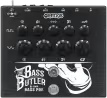
The MXR M81 Bass Preamp is the natural comparison. Both cover preamp, sweepable mid EQ, and DI in a single pedal. The M81 sweeps its mid from 250 Hz to 1 kHz, catching the low-mid weight range the Badwater’s LMF band skips, and its PRE/POST DI switch lets front of house receive a flat signal while your EQ shapes only the stage amp. It runs on a 9V battery, fits in a gig bag pocket, and keeps things simple: no compressor, no parallel drive blend.
The Badwater covers more ground. You get the optical compressor, the three-voice blendable drive section, and both XLR and quarter-inch outputs active simultaneously with a ground lift. If you need compression and drive character alongside your DI, the Badwater handles it all. If you want a compact, no-fuss preamp with a DI that sweeps deeper into the bass frequency range, the M81 is the leaner choice.
Who It’s For
Bass players who want one pedal to cover preamp, DI, compression, and drive. It works for recording direct and for live use where you need a line to front of house and a signal to your amp at the same time. The drive voicings and blend keep it flexible across a wide range of tones.
The honest caveat: if you’re chasing classic low-mid weight around 200 to 300 Hz, you’ll be doing most of that work with the Low shelf rather than the parametric bands. If I could make a wish for a V2 (the Goodwater, haha), it would be a headphone out and probably an effects loop, just for inserting a cab sim before the DI out.
Specs
Circuit: optical compressor, blendable drive with three voicings, four-band EQ with parametric mids
Controls: Vol, Low (plus or minus 12 dB), Low Mid (plus or minus 10 dB), LMF sweep 500 Hz to 2.4 kHz, High Mid (plus or minus 10 dB), HMF sweep 3.5 kHz to 7.5 kHz, High (plus or minus 12 dB), Drive, Level, Blend, Sustain, Voice (3-position toggle)
Outputs: 1/4″ instrument out and XLR line-level out, both active simultaneously
Ground lift switch
Two footswitches: main bypass, plus a separate footswitch and LED for the drive section
Power: 9V DC center negative, 300 mA minimum; isolated power supply recommended, daisy chain not recommended
Iridium, preamp section bypassed, cab sim with an OwnHammer AMPG cab as demoed here. The cab mix I chose was a 4x10 cab with “fat” voiced microphones.
I wanted to make the bass sound as untreated as possible so you mostly hear what the Badwater does. I really can’t stand overdriven bass without a cab sim behind it. That’s why I have the cab sim as the last stage for all sounds you’re hearing.
You don’t need an Iridium for that, there are free IR loader plugins for your DAW. This was just the most convenient way for me.
Also, I can’t tell you how this sounds through a PA on a live stage, D.I. without cab sim. It might be fine, I just lack live experience as a bass player.
Atmospheric pad sounds
You can hear this best in the intro part of the loop.
K’mo Memphis Std., T-style neck pickup
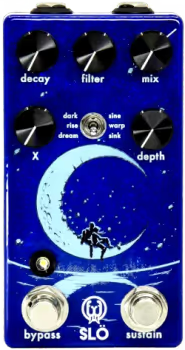
Just a two-note interval played once into the Walrus Audio Slö in dream mode with the endless sustain engaged
These are a little buried in the mix. They’re just strummed chords that accentuate the main guitar arpeggios. You probably can’t hear them, but you would notice it if they were gone. They add another dimension for that 80s reverb feel and add more weight to the arpeggiated notes of the main guitar.
K’mo Memphis Std, neck pickup
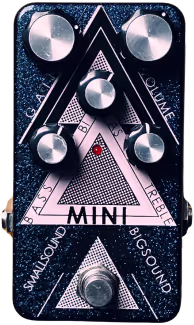
Mini (low gain)
CBA Mood for lo-fi reverb
Iridium (chime)
Two takes, hard-panned left and right
Drums
GarageBand Drummer Gavin (indie rock) on the Brooklyn kit
Kick and snare treated with a stock Rat-style pedal plugin and mixed in to make the drums more gritty
Some compression
Everything was mixed with a exciter, subtle compression and limiter on the master track to glue everything together.