Compressor Mini - Keeley Electronics
The Mira is Walrus Audio’s version of a highly tweakable optical compressor. Compressors are hard to demo because done correctly they are subtle, and optical compressors are especially so. Compression is something I usually do in the DAW to glue together a track. The reason to have it right in the signal chain is to make the guitar feel different under your fingers, and the Mira sure does feel good.
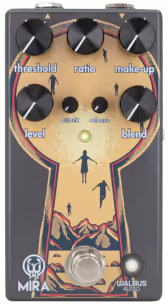
The Mira has seven controls across two rows. Reading the top row left to right: Threshold, Ratio, and Make-Up. The bottom row runs Level, then the smaller Attack and Release trimmer knobs, then Blend. On the side panel sits a push-button for the sidechain High Pass Filter (HPF).
Threshold sets how loud the signal needs to be before compression kicks in. Ratio controls how hard it clamps down once the threshold is crossed. Make-Up keeps your volume even after compression has turned things down, and Level sets the final output. Attack and Release are the smaller knobs in the middle of the bottom row: Attack shapes how quickly the compression engages, and Release sets how fast it lets go. Blend is the one that makes the Mira especially versatile: it mixes the compressed signal back with your dry signal, so you can dial in sustain and squish while keeping the natural pick attack of the uncompressed guitar underneath. The HPF tells the sidechain circuit to treat frequencies below 120Hz less aggressively, which is useful when running bass through it or any signal where you want the low end to sit outside the compressor’s reach.
In the demo above I’ve set up sweeps for the Threshold, Ratio, Attack, Release, and Blend knobs, so you can hear what each one does to the same performance.
The difference between the Mira and simpler compressors is that you can tweak it to your exact needs. You can make your instrument feel squishy, or just even out dynamics, increase sustain, and make it work for bass or guitar.
The named presets map that range. Squashed takes Threshold all the way down to 0, Ratio up to 10, and Make-Up to 10 with the blend fully wet, which gives you the most dramatic, pillowy compression the pedal can produce. Subtle Compression parks every knob at 5 for a balanced, transparent starting point. Limiter pushes the Threshold up to 9 with a Ratio of 3 and full Blend, behaving more like a ceiling than a squeeze. Crisp Attack sets the attack to 8 with Blend at 4, letting the initial transient cut through before the compression closes in. The Side-chain HPF On and Off presets use the same settings across both so you can hear exactly what that button does to a heavily compressed signal.
The Orange King Comp is the other compressor recently covered on this site, and the two pedals approach the job from opposite directions. The King Comp is a Class A VCA circuit running at 18V: fast, precise, aimed at players who want compression as always-on infrastructure rather than as an audible texture. Its four-knob layout is intentionally streamlined, and it has no blend control and no ratio knob. The Mira is an optical design, which means the compression element is a light-dependent resistor reacting to an LED, a slower and more organic-feeling response than a VCA. That optical behavior is part of why the squish feels warmer and more pliable. On top of that, the Mira gives you a dedicated Ratio knob, independent Make-Up and Level controls, the Blend for parallel compression, and the HPF sidechain button, so there are more dimensions to shape. If you want a simple, low-noise, set-and-forget comp that stays out of the way, the King Comp is the cleaner choice. If you want to get into the mechanics of optical compression and dial in a very specific feel, the Mira gives you the tools to do that.
The Mira is a good fit for players who want to understand what a compressor is actually doing to their signal. The blend knob alone makes it more approachable than many transparent optical designs, because you can start with the blend low and raise it until you find the texture you want without losing all your natural attack. Bass players get a specifically useful tool in the HPF switch: heavy low end stays largely unaffected while the compressor works the mids and highs. The honest caveat is that optical compression is inherently slower than a VCA, so if you want an ultra-precise, punchy clamp, you may find the feel a bit looser than expected. Players after something to grab in one or two knob turns will do fine with a simpler pedal. But for anyone who wants optical warmth and the ability to tune every part of the compression curve, the Mira covers it well.
Main Guitar
Ambience
Lead Guitar
Bass
Drums
The whole mix was “mastered” with exciter, limiter and mild compression in the DAW (except the main guitar tracks).
 Snag one here
 Buy through these links and support Loopy Demos at no extra cost to you.
Get detailed specs on Walrus Audio's website
<div data-loopydemos="walrus-audio-mira" data-title="Walrus Audio Mira | Loopy Demos" data-width="400" data-height="610"></div>
<script src="https://loopydemos.com/embed.js" async></script>To embed this demo on your website, copy & paste the code above or customize your demo widget